Introduction
So, you've joined the RS and you want to meet fellow officers. How, might you ask? Through Internet Relay Chat, or IRC.
IRC is the chat service the RS primarily uses for communication(other than e-mail, of course.) Most events hosted by the various fleets are hosted through IRC, mainly because it's an efficient and easy service to use; best of all, it's free to all netizens unlike the AOL chat rooms that the RS used in its past.
By reading this brief tutorial, you should gain enough knowledge to connect to IRC and begin meeting fellow RSers. If you have any any problems or questions, feel free to use the Contact Us link on the left, and the Internet Office will do its best to help you out.
What Do I Need to Chat?
To begin chatting with fellow members, you first need an IRC client, or a program that can connect you to IRC servers. The majority of RS members use a program called mIRC, a reliable, easy-to-use IRC client. Download it from Here.
How Do I Get on the Chat Server?
Once you've downloaded the chat client, you need to connect to the chat server. After installation, open IRC; you should see an information window pop. Click anywhere on that box, and another window should pop up that looks something like this:
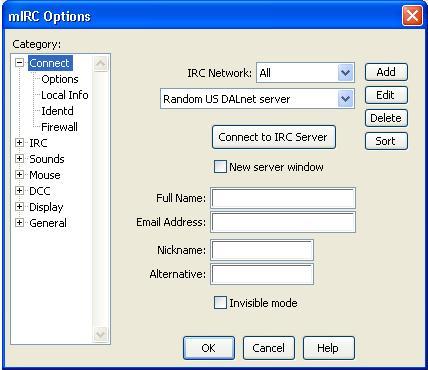
This window contains important information that needs to be entered correctly to ensure you connect to the correct network; the RS chat rooms are located on only one network out of many listed in the drop list. The RS chat rooms are located on the UNDERNET network. To set this up, open the drop list next to "IRC Network: " and scroll down until you find Undernet. Select Undernet as the network. Once you have done this, open the drop list under the Network list and pick the server there that's closest to where you live. Then, fill out the the information requested, such as your Name, Email Address(neither of which need to be true; a character name would be sufficient, etc.), Nickname and Alternative(Nickname is the name people in the chat rooms will see you as, Alternative will be your name if someone is already connected to the server with that name).
When you're all set up, the window should look something like this:
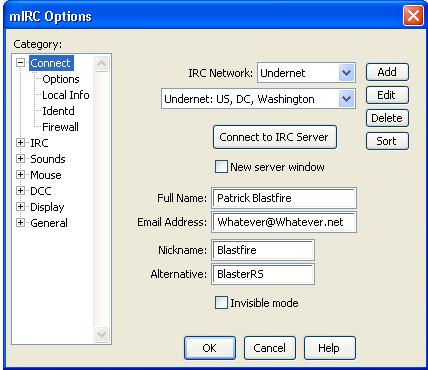
At this point, hit "Connect to IRC Server" and it'll begin connecting. Welcome to the IRC Server!
How Do I Start Chatting?
Once you're on the server, it's easy to begin chatting with fellow RSers! A window should have popped up on connection that looks like this:
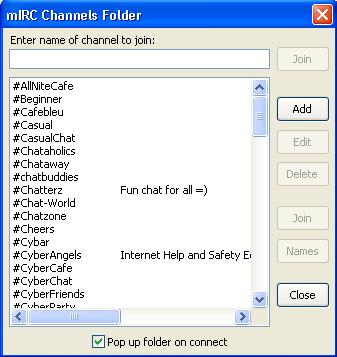
Hit the "Add" button, and where it asks for the
Channel, enter this: #rebelsquadrons
Click OK, and the RS' main chat room will be entered into the list shown above.
Simply scroll down until you find it, double click its name, and you'll join
the room.
There you have it! Once you're in, feel free to begin chatting with fellow officers. If you have any questions, feel free to ask as most will gladly help you out if they can. As said earlier, if you have any questions or comments about this tutorial or IRC in general, use the Contact Us link to the left and we'll get back to you ASAP.
Tutorial by: MGN Patrick
Blastfire,
Assistant Internet Officer, IRC